什么是抽象工厂模式

抽象工厂模式是一种软件设计模式,它提供了一种方法来创建相关或依赖对象的组合,而不需要指定它们的具体类。

这种模式把对象的创建延迟到子类,使得子类可以决定实例化哪些类。这样,程序可以在运行时动态地改变它所使用的对象,而不需要修改代码。

抽象工厂模式通常由以下几个部分组成:

  • 抽象工厂(Abstract Factory):它是工厂模式的核心,是与应用程序无关的。它声明了用于创建一组相关或相互依赖对象的接口,每个接口方法对应一个产品。

  • 具体工厂(Concrete Factory):它实现了在抽象工厂中声明的创建产品的方法。

  • 抽象产品(Abstract Product):它是工厂模式所创建的对象的父类,封装了所有它的共性。

  • 具体产品(Concrete Product):它是继承自抽象产品的具体类,实现了在抽象产品中声明的抽象方法。

例1

1
2
3
4
5
6
7
8
9
10
11
12
13
14
15
16
17
18
19
20
21
22
23
24
25
26
27
28
29
30
31
32
33
34
35
36
37
38
39
40
interface Animal {
makeSound(): void;
}

class Dog implements Animal {
makeSound() {
console.log('Bark');
}
}

class Cat implements Animal {
makeSound() {
console.log('Meow');
}
}

interface AnimalFactory {
createAnimal(): Animal;
}

class DogFactory implements AnimalFactory {
createAnimal() {
return new Dog();
}
}

class CatFactory implements AnimalFactory {
createAnimal() {
return new Cat();
}
}

// 用法
const dogFactory = new DogFactory();
const dog = dogFactory.createAnimal();
dog.makeSound(); // Bark

const catFactory = new CatFactory();
const cat = catFactory.createAnimal();
cat.makeSound(); // Meow

在这个例子中,我们有 Animal 接口和两个实现它的类 DogCat。我们还有一个 AnimalFactory 接口和两个实现它的类 DogFactoryCatFactory,这些类分别生成 DogCat 对象。

然后我们可以使用工厂类来创建新的动物对象,而无需直接使用具体的类名。这使得我们可以在不改变客户端代码的情况下更改动物类的实现。

例2

假设你正在开发一个用于制作披萨的应用程序。披萨的制作需要许多不同的原料,包括面团、酱料、蔬菜和肉类。你可以使用抽象工厂模式来创建用于制作这些原料的工厂。

例如,你可以创建一个抽象工厂接口 PizzaIngredientFactory,其中定义了用于创建各种原料的方法,如 createDough()createSauce()createVeggies()createMeat()。然后,你可以创建一个具体工厂类,如 NYPizzaIngredientFactoryChicagoPizzaIngredientFactory,它们实现了 PizzaIngredientFactory 接口并具体提供了如何创建原料的方法。

然后,你可以使用这些工厂来创建不同类型的披萨,如芝士披萨或辣香肠披萨。每种披萨都可以使用特定工厂的方法来创建所需的原料,而无需关心它们是如何制作的。

下面是 typescript 代码实例:
首先,你可以创建一个抽象工厂接口,如下所示:

1
2
3
4
5
6
interface PizzaIngredientFactory {
createDough(): Dough;
createSauce(): Sauce;
createVeggies(): Veggies[];
createMeat(): Meat;
}

定义披萨原料接口:

1
2
3
4
5
6
7
8
9
10
11
12
13
14
15
interface Dough {
// ...
}

interface Sauce {
// ...
}

interface Veggies {
// ...
}

interface Meat {
// ...
}

实现披萨原料工厂接口:

1
2
3
4
5
6
7
8
9
10
11
12
13
14
15
16
17
18
19
20
21
22
23
24
25
26
27
28
29
30
31
32
33
34
35
36
37
class NYPizzaIngredientFactory implements PizzaIngredientFactory {
createDough(): Dough {
// 创建纽约风味的面团
}

createSauce(): Sauce {
// 创建纽约风味的酱料
}

createVeggies(): Veggies[] {
// 创建纽约风味的蔬菜
}

createMeat(): Meat {
// 创建纽约风味的肉类
}
}


class ChicagoPizzaIngredientFactory implements PizzaIngredientFactory {
createDough(): Dough {
// 创建芝加哥风味的面团
}

createSauce(): Sauce {
// 创建芝加哥风味的酱料
}

createVeggies(): Veggies[] {
// 创建芝加哥风味的蔬菜
}

createMeat(): Meat {
// 创建芝加哥风味的肉类
}
}

使用披萨原料工厂创建披萨

1
2
3
4
5
6
7
8
9
10
class Pizza {
// ...

prepare(ingredientFactory: PizzaIngredientFactory) {
this.dough = ingredientFactory.createDough();
this.sauce = ingredientFactory.createSauce();
this.veggies = ingredientFactory.createVeggies();
this.meat = ingredientFactory.createMeat();
}
}

然后,你可以创建一个具体工厂类,如下所示:

1
2
3
4
5
6
7
8
9
10
11
12
13
14
class NYPizzaIngredientFactory implements PizzaIngredientFactory {
createDough(): Dough {
// Return a thin crust dough
}
createSauce(): Sauce {
// Return a marinara sauce
}
createVeggies(): Veggies[] {
// Return an array of vegetables
}
createMeat(): Meat {
// Return sausage as the meat
}
}

定义不同风味的 pizza:

1
2
3
4
5
6
7
class CheesePizza extends Pizza {
// ...
}

class PepperoniPizza extends Pizza {
// ...
}

最后,你可以使用这些工厂来创建披萨对象,如下所示:

1
2
3
4
5
6
7
8
9
10
// 创建原料工厂
const nyPizzaIngredientFactory = new NYPizzaIngredientFactory();
const chicagoPizzaIngredientFactory = new ChicagoPizzaIngredientFactory();

// 创建不同的 pizza
const cheesePizza = new CheesePizza();
cheesePizza.prepare(nyPizzaIngredientFactory);

const pepperoniPizza = new PepperoniPizza();
pepperoniPizza.prepare(chicagoPizzaIngredientFactory);

现在,你就可以使用不同的工厂来创建具有不同风味的披萨,而无需关心如何制作这些披萨的原料。

如果你想要添加新的披萨种类或者修改已有的披萨种类,只需要扩展 Pizza 类即可。你也可以通过创建新的工厂类来支持不同风味的披萨,而无需修改现有的代码。

总的来说,抽象工厂模式可以让你更轻松地创建相关对象的组合,并且可以更灵活地更改这些对象的实现方式。它在软件开发中非常常用,可以为你的应用程序提供很大的灵活性和扩展性。

抽象工厂模式和工厂方法模式的关系

抽象工厂模式提供了一种方法来创建一组相关的产品对象,而工厂方法模式提供了一种方法来创建单个产品对象。

在工厂方法模式中,有多个具体的工厂类来生成不同的产品对象。如果这些具体的工厂类之间有相同的部分,那么我们可以将这些相同的部分封装到一个抽象工厂类中,具体的工厂类继承抽象工厂类,实现生成产品对象的方法。

这样就可以将工厂方法模式进一步抽象成抽象工厂模式。在抽象工厂模式中,抽象工厂负责声明创建一组相关的产品对象的方法,具体的工厂负责生成具体的产品对象。

总的来说,抽象工厂模式是在工厂方法模式的基础上进一步抽象的一种设计模式,它提供了一种方法来创建一组相关的产品对象。

练习

题目

你正在开发一个用于制作冰激凌的应用程序。冰激凌的制作需要许多不同的原料,包括牛奶、香料、水果和冰块。你可以使用抽象工厂模式来创建用于制作这些原料的工厂。

请使用 TypeScript 实现以下内容:

  1. 定义冰激凌原料工厂接口 IceCreamIngredientFactory,其中定义了用于创建各种原料的方法,如 createMilk()createSpice()createFruit()createIce()

  2. 定义冰激凌原料接口 MilkSpiceFruitIce

  3. 实现冰激凌原料工厂接口,创建两个具体工厂类:

  • VanillaIceCreamIngredientFactory:创建用于制作香草冰激凌的原料。
  • ChocolateIceCreamIngredientFactory:创建用于制作巧克力冰激凌的原料。
  1. 定义冰激凌类 IceCream,其中包含一个 prepare() 方法,该方法使用冰激凌原料工厂创建所需的所有原料。

  2. 定义两种具体的冰激凌类:

  • VanillaIceCream:制作香草冰激凌。
  • ChocolateIceCream:制作巧克力冰激凌。
  1. 创建冰激凌。

答案

  1. 定义一个抽象工厂函数的接口:

    1
    2
    3
    4
    5
    6
    Interface IceCreamIngredientFactory {
    createMilk(): Milk;
    createSpice(): Spice;
    createFruit(): Fruit;
    createIce(): Ice;
    }
  2. 定义原料接口:

    1
    2
    3
    4
    5
    6
    7
    8
    9
    10
    11
    12
    13
    14
    15
    interface Milk {
    //...
    }

    interface Spice{
    //...
    }

    interface Fruit {
    //...
    }

    interface Ice {
    //...
    }
  3. 实现两个具体原料工厂

  • VanillaIceCreamIngredientFactory:创建用于制作香草冰激凌的原料。
  • ChocolateIceCreamIngredientFactory:创建用于制作巧克力冰激凌的原料。
    1
    2
    3
    4
    5
    6
    7
    8
    9
    10
    11
    12
    13
    14
    15
    16
    17
    18
    19
    20
    21
    22
    23
    24
    25
    26
    27
    28
    29
    class VanillaIceCreamIngredientFactory implements IceCreamIngredientFactory{
    createMilk(): Milk{
    // Vanilla...
    }
    createSpice(): Spice{
    // Vanilla...
    }
    createFruit(): Fruit{
    // Vanilla...
    }
    createIce(): Ice{
    // Vanilla...
    }
    }

    class ChocolateIceCreamIngredientFactory implements IceCreamIngredientFactory{
    createMilk(): Milk{
    // Chocolate...
    }
    createSpice(): Spice{
    // Chocolate...
    }
    createFruit(): Fruit{
    // Chocolate...
    }
    createIce(): Ice{
    // Chocolate...
    }
    }
  1. 定义冰激凌类

    1
    2
    3
    4
    5
    6
    7
    8
    9
    class IceCream{
    // ...
    preper(iceCreamIngredientFactory: IceCreamIngredientFactory){
    this.milk = iceCreamIngredientFactory.createMilk();
    this.spice = iceCreamIngredientFactory.createSpice();
    this.fruit = iceCreamIngredientFactory.createFruit();
    this.ice = iceCreamIngredientFactory.createIce();
    }
    }
  2. 定义两个具体的冰激凌类

    1
    2
    3
    4
    5
    6
    7
    8
    9
    10
    11
    12
    13
    14
    15
    16
    17
    18
    19
    class VanillaIceCream extend IceCream {
    //...

    preper(iceCreamIngredientFactory: VanillaIceCreamIngredientFactory){
    this.milk = iceCreamIngredientFactory.createMilk();
    this.spice = iceCreamIngredientFactory.createSpice();
    this.fruit = iceCreamIngredientFactory.createFruit();
    this.ice = iceCreamIngredientFactory.createIce();
    }
    }
    class ChocolateIceCream extend IceCream{
    //...
    preper(iceCreamIngredientFactory: ChocolateIceCreamIngredientFactory){
    this.milk = iceCreamIngredientFactory.createMilk();
    this.spice = iceCreamIngredientFactory.createSpice();
    this.fruit = iceCreamIngredientFactory.createFruit();
    this.ice = iceCreamIngredientFactory.createIce();
    }
    }
  3. 创建原料工厂, 创建冰激凌

    1
    2
    3
    4
    5
    6
    7
    const vanillaIceCreamIngredientFactory = new VanillaIceCreamIngredientFactory();
    const ChocolateIceCreamIngredientFactory = new ChocolateIceCreamIngredientFactory();
    const vanillaIceCream = new VanillaIceCream();
    vanillaIceCream.preper(vanillaIceCreamIngredientFactory)

    const chocolateIceCream = new ChocolateIceCream();
    chocolateIceCream.preper(ChocolateIceCreamIngredientFactory);

抽象工厂模式所遵循的原则

  1. 依赖倒置原则(Dependency Inversion Principle):抽象不应该依赖于细节,细节应该依赖于抽象。在抽象工厂模式中,抽象工厂是依赖于抽象产品的,而具体工厂和具体产品是依赖于抽象工厂和抽象产品的。

  2. 开闭原则(Open-Closed Principle):软件实体应该对扩展开放,对修改关闭。在抽象工厂模式中,抽象工厂和抽象产品是对扩展开放的,因为可以添加新的产品和工厂,但是对修改关闭,因为无需修改已有的产品和工厂。

  3. 里氏替换原则(Liskov Substitution Principle):所有引用基类(父类)的地方必须能透明地使用其子类的对象。在抽象工厂模式中,客户端使用抽象工厂和抽象产品,因此可以使用具体工厂和具体产品的对象,而不会受到影响。

抽象工厂模式的优缺点

抽象工厂模式的优点包括:

  1. 它支持产品的多种实现,使得可以在不更改客户端的情况下更换产品的实现。
  2. 它允许系统独立于产品的创建、组合和表示。
  3. 它提供了一种灵活的方法来创建产品,使得可以在不更改客户端的情况下更改产品的实现。

缺点:

  1. 它增加了系统的复杂度,因为它提供了更多的抽象层。

抽象工厂模式的适用场景

  1. 你需要为多种类型的产品提供一个抽象接口。
  2. 你希望系统独立于产品的创建、组合和表示。
  3. 你希望在不更改客户端的情况下更换产品的实现。
  4. 你希望在系统中使用一组产品,而无需指定这些产品的具体类

更多的例子

  1. 创建一个图形编辑器,可以绘制圆形、矩形和直线。你可以使用抽象工厂模式来创建这些图形的不同实现,例如圆形可以使用圆周率计算面积,而矩形可以使用长宽乘积计算面积。

  2. 抽象工厂模式可以用来创建不同的 UI 元素,比如表格、按钮、输入框等。

假设你正在开发一个用于显示数据的应用,其中有多种不同的表格可供选择,每种表格都有自己的样式和功能。在这种情况下,你可以使用抽象工厂模式来创建不同类型的表格。

下面是一个使用抽象工厂模式创建表格的示例:

1
2
3
4
5
6
7
8
9
10
11
12
13
14
15
16
17
18
19
20
21
22
23
24
25
26
27
28
29
30
31
32
33
34
35
36
37
38
39
40
41
42
43
44
45
46
// 定义抽象工厂
class TableFactory {
createTable(type) {
throw new Error('createTable method must be implemented')
}
}

// 定义具体工厂
class BasicTableFactory extends TableFactory {
createTable(type) {
switch (type) {
case 'basic':
return new BasicTable()
case 'striped':
return new StripedTable()
default:
throw new Error('Invalid table type')
}
}
}

// 定义抽象产品
class Table {
render() {
throw new Error('render method must be implemented')
}
}

// 定义具体产品
class BasicTable extends Table {
render() {
console.log('Rendering basic table...')
}
}

class StripedTable extends Table {
render() {
console.log('Rendering striped table...')
}
}

// 使用工厂创建产品
const factory = new BasicTableFactory()
const table = factory.createTable('striped')
table.render() // 输出: Rendering striped table...

在这个示例中,我们定义了一个抽象工厂 TableFactory 和一个具体工厂 BasicTableFactory,以及一个抽象产品 Table 和两个具体产品 BasicTableStripedTable。然后,我们使用 BasicTableFactory

实例来创建不同类型的表格,最后我们调用表格的 render 方法来渲染表格。

这样,我们就可以使用抽象工厂模式来创建不同类型的表格,而无需关心具体的实现细节。如果需要增加新的表格类型,只需要在 BasicTableFactory 中添加新的代码来创建新的表格对象即可。

  1. 假设你正在开发一个画图应用,其中有多种不同的图形可供选择,每种图形都有自己的样式和功能。在这种情况下,你可以使用抽象工厂模式来创建不同类型的图形。

下面是一个使用抽象工厂模式创建图形的示例:

1
2
3
4
5
6
7
8
9
10
11
12
13
14
15
16
17
18
19
20
21
22
23
24
25
26
27
28
29
30
31
32
33
34
35
36
37
38
39
40
41
42
43
44
45
// 定义抽象工厂
class ShapeFactory {
createShape(type) {
throw new Error('createShape method must be implemented')
}
}

// 定义具体工厂
class BasicShapeFactory extends ShapeFactory {
createShape(type) {
switch (type) {
case 'circle':
return new Circle()
case 'rectangle':
return new Rectangle()
default:
throw new Error('Invalid shape type')
}
}
}

// 定义抽象产品
class Shape {
draw() {
throw new Error('draw method must be implemented')
}
}

// 定义具体产品
class Circle extends Shape {
draw() {
console.log('Drawing circle...')
}
}

class Rectangle extends Shape {
draw() {
console.log('Drawing rectangle...')
}
}

// 使用工厂创建产品
const factory = new BasicShapeFactory()
const shape = factory.createShape('circle')
shape.draw() // 输出: Drawing circle...
  1. 还有一个常见的例子是使用抽象工厂模式来创建不同的数据访问对象(DAO)。
    DAO 是 Data Access Object 的缩写,意思是数据访问对象。

它是一种设计模式,主要用于封装数据库访问相关的代码,使得应用程序可以通过统一的接口来访问不同类型的数据库。

DAO 的目的是将数据库的访问与业务逻辑分离开来,使得业务逻辑可以与不同的数据库无缝切换。这样,如果你希望将应用程序从一种数据库迁移到另一种数据库,你只需要修改 DAO 层的代码即可,而无需修改业务逻辑层的代码。
假设你正在开发一个应用,该应用可以使用不同的数据库类型来存储数据,比如 MySQL、PostgreSQL 和 MongoDB。在这种情况下,你可以使用抽象工厂模式来创建不同类型的数据访问对象。

下面是一个使用抽象工厂模式创建数据访问对象的示例:

1
2
3
4
5
6
7
8
9
10
11
12
13
14
15
16
17
18
19
20
21
22
23
24
25
26
27
28
29
30
31
32
33
34
35
36
37
38
39
40
41
42
43
44
45
46
47
48
49
50
51
52
53
54
55
56
57
58
59
60
61
62
63
64
65
66
67
68
69
70
71
72
73
74
75
76
77
78
79
80
81
82
83
84
85
86
87
88
89
90
91
92
93
94
95
96
97
98
99
100
101
102
103
104
105
106
107
108
109
110
111
112
113
114
115
116
117
118
119
120
121
122
123
// 定义抽象工厂
class DaoFactory {
createDao(type) {
throw new Error('createDao method must be implemented')
}
}

// 定义具体工厂
class MySQLDaoFactory extends DaoFactory {
createDao(type) {
switch (type) {
case 'user':
return new MySQLUserDao()
case 'product':
return new MySQLProductDao()
default:
throw new Error('Invalid DAO type')
}
}
}

class PostgreSQLDaoFactory extends DaoFactory {
createDao(type) {
switch (type) {
case 'user':
return new PostgreSQLUserDao()
case 'product':
return new PostgreSQLProductDao()
default:
throw new Error('Invalid DAO type')
}
}
}

class MongoDBDaoFactory extends DaoFactory {
createDao(type) {
switch (type) {
case "user":
return new MongoDBUserDao()
case "product":
return new MongoDBProductDao()
default:
throw new Error("Invalid DAO type")
}
}
}
// 定义抽象产品
class Dao {
save() {
throw new Error("save method must be implemented")
}

find() {
throw new Error("find method must be implemented")
}
}

// 定义具体产品
class MySQLUserDao extends Dao {
save() {
console.log("Saving user to MySQL database...")
}

find() {
console.log("Finding user in MySQL database...")
}
}

class MySQLProductDao extends Dao {
save() {
console.log("Saving product to MySQL database...")
}

find() {
console.log("Finding product in MySQL database...")
}
}

class PostgreSQLUserDao extends Dao {
save() {
console.log("Saving user to PostgreSQL database...")
}

find() {
console.log("Finding user in PostgreSQL database...")
}
}


class PostgreSQLProductDao extends Dao {
save() {
console.log("Saving product to PostgreSQL database...")
}
find() {
console.log("Finding product in PostgreSQL database...")
}
}

class MongoDBUserDao extends Dao {
save() {
console.log("Saving user to MongoDB database...")
}

find() {
console.log("Finding user in MongoDB database...")
}
}

class MongoDBProductDao extends Dao {
save() {
console.log("Saving product to MongoDB database...")
}

find() {
console.log("Finding product in MongoDB database...")
}
}

// 使用工厂创建产品
const factory = new MySQLDaoFactory()
const dao = factory.createDao('user')
dao.save() // 输出: Saving user to MySQL database...

在这个示例中,我们定义了一个抽象工厂 DaoFactory 和三个具体工厂 MySQLDaoFactory、PostgreSQLDaoFactory 和 MongoDBDaoFactory,以及一个抽象产品 Dao 和六个具体产品。然后,我们使用 MySQLDaoFactory 实例来创建数据访问对象,最后我们调用数据访问对象的 save 方法来保存数据。

这样,我们就可以使用抽象工厂模式来创建不同类型的数据访问对象,而无需关心具体的实现细节。如果需要增加新的数据库类型,只需要添加新的工厂类和数据访问对象类即可。
Slots 为何而在

有这样一种场景,就是说我们需要在一个模板中插入自己定制话的内容。比方说在一个弹窗中加入定制化的标题。
抽象一下,就是说在一个组件中加入来自外部的渲染逻辑。

设计实现

类似于 HTML <div> 内容 </div>
只不过这里把 div 换成了组件而已。

例如我们这里有一个 Foo 组件 并且有 I'm Slots 字符串作为它的 Slots
在 template 表示如下:

1
<Foo>I'm Slots</Foo>

编译成渲染函数以渲染函数的

1
2
3
4
5
6
7
8
9
10
11
12
13
const Foo = {
render() {
return h("div", {}, 'foo');
},
...
};

const FooWithSlots= {
render(){
return h(Foo, {}, "I'm a Slots")
}
...
}

为了在 Foo 组件中正确地显示 Slots,我们希望可以以 this.$slots 方式拿到传入的 slots。
我们在作以下处理:
首先我们在新建组件实例的时候新建一个空的 slots。
📁 component.ts

1
2
3
4
5
6
7
8
9
export function createComponentInstance(vnode) {
const instance = {
...
slots: {},
...
};
...
return instance;
}

📁 componentPublicInstance.ts

1
2
3
4
5
const publicPropsMap = {
...
$slots: (i) => i.slots,
...
};

然后我们就可以在 Foo 组件中通过 this.$slot 拿到传入的 slots。

什么是设计模式

设计模式是软件工程中用于解决各种设计问题的方法和技巧。它们是软件设计中经过精心思考和反复使用的最佳实践,用于帮助软件开发人员解决常见的设计问题。设计模式的目的是提高代码的可复用性,同时使代码更具可读性和可维护性。

设计模式有很多种类型,包括创建型模式、结构型模式和行为型模式。创建型模式主要关注如何创建对象,结构型模式主要关注如何组合对象来创建新的结构,而行为型模式主要关注对象之间的通信和协作。

常见的设计模式包括单例模式、工厂模式、抽象工厂模式、建造者模式、原型模式、适配器模式、装饰器模式、代理模式、外观模式、模板方法模式、观察者模式、迭代器模式、策略模式、状态模式和职责链模式。

设计模式并不是绝对必要的,但它们可以帮助软件开发人员在设计和实现软件时更加结构化和有效,并使代码更具可读性和可维护性。使用设计模式也可以使软件开发团队之间的沟通和协作更加有效。

使用设计模式的过程通常包括三个步骤:

  1. 识别问题:首先,你需要发现设计问题,并确定是否可以使用设计模式来解决它。
  2. 选择合适的模式:其次,你需要确定哪种设计模式最适合解决问题。你可以参考设计模式的分类和定义,以确定最合适的模式。
  3. 应用模式:最后,你需要实际使用设计模式来解决问题。这可能需要改变你的代码的结构和实现方式。

设计模式是软件设计的重要工具,可以帮助软件开发人员更加有效地解决设计问题,使代码更具可读性和可维护性。

==设计模式以模式(pattern)为基本单元, 这里的模式是解决问题的一种抽象,是一种「套路」。==

设计模式的历史

设计模式的是经验的积累, 在面对对象的设计中,对常见问题的套路总结形成了设计模式。

设计模式最初是由四位软件设计师——Erich Gamma、Richard Helm、Ralph Johnson 和 John Vlissides——在 20 世纪 90 年代提出的。他们合作写了一本书,名为《设计模式:可复用面向对象软件的基础》(Design Patterns: Elements of Reusable Object-Oriented Software),简称“GoF ” 的书。这本书在软件设计领域中受到了广泛的关注和重视。

设计模式逐渐成为一种共识。 这种 「共识」 本身就是一种价值。它可以减少交流成本。
比方说大家说这里用 「单例」 , 大家马上知道怎么回事,而不用做其他解释。

设计模式的争议

然而,设计模式并不是万能的,并且在某些情况下可能并不是最佳选择。对于设计模式的争议主要有以下几点:

  1. 设计模式是否过于复杂?有些人认为设计模式本身就是复杂的,它们会使软件设计变得过于复杂,并且难以理解。
  2. 设计模式是否过于抽象?有些人认为设计模式过于抽象,它们并不能直接用于实际的软件开发中,因此难以使用。
  3. 设计模式是否有滥用的风险?有些人认为设计模式容易被滥用,因为人们往往倾向于使用它们来解决所有问题,而不是仅在适当的情况下使用它们。

    当你手里只有一把锤子,你会看什么都像钉子

  4. 设计模式是否会使代码变得不够灵活?有些人认为设计模式会使代码变得不够灵活,因为它们是一种预先定义的解决方案,可能不能完全适应每一种情况。
  5. 设计模式是否会使代码变得过于庞大?有些人认为使用设计模式会使代码变得过于庞大,因为它们通常会增加代码的复杂度和体积。
  6. 设计模式是否会导致代码变得过于臃肿?有些人认为使用设计模式会导致代码变得过于臃肿,因为它们通常会增加代码的复杂度和冗余。

尽管存在这些争议,但设计模式仍然是软件工程中的一个重要概念,并且在解决软件设计问题时可能是有用的工具。它们需要在适当的情况下使用,并且应该根据实际情况进行调整和定制。

设计模式的分类

设计模式通常可以分为以下几类:

  1. 创建型模式:这类模式涉及到如何创建对象,包括工厂方法模式、抽象工厂模式、单例模式、建造者模式和原型模式。
  2. 结构型模式:这类模式涉及到如何将类或对象组合在一起形成更大的结构,包括适配器模式、桥接模式、装饰器模式、组合模式、外观模式和享元模式。
  3. 行为型模式:这类模式涉及到类和对象之间的交互和通信,包括责任链模式、命令模式、解释器模式、迭代器模式、中介者模式、备忘录模式、观察者模式、状态模式、策略模式、模板方法模式和访问者模式。
  4. 其他模式:这类模式包括并发型模式、分治型模式和资源库型模式。

这些模式是根据它们解决的问题的类型进行分类的。例如,创建型模式涉及到如何创建对象,结构型模式涉及到如何将类或对象组合在一起,行为型模式涉及到类和对象之间的交互和通信。

并且,这些模式还可以根据它们解决问题的方式进行进一步划分。例如,创建型模式可以进一步划分为类创建型模式和对象创建型模式,结构型模式可以进一步划分为类结构型模式和对象结构型模式,行为型模式可以进一步划分为类行为型模式和对象行为型模式。

需要注意的是,不同的设计模式可能会有重叠的部分,并不是每一个模式都严格属于一个特定的类别。例如,桥接模式既可以归类为结构型模式,也可以归类为行为型模式。

需求

给所有 console.log 带上 行号和列号

1
console.log('hello')

自动转换为

1
console.log("line: <line>, column: <column>)", 'hello')

先搭好流程:

1
2
3
4
5
6
7
8
9
10
11
12
13
14
15
16
17
18
19
20
21
22
23
24
const parser = require('@babel/parser');
const traverse = require('@babel/traverse').default;
const generate = require('@babel/generator').default;
const types = require('@babel/types');

const sourceCode = `console.log('hello');`;

const ast = parser.parse(sourceCode, {
sourceType: 'unambiguous'
});

traverse(ast, {
CallExpression(path, state) {
if(path.node.callee.object.name === 'console'
&& ['log', 'info', 'error', 'debug'].includes(path.node.callee.property.name)){
const { line, column } = path.node.loc.start;
path.node.arguments.unshift(types.StringLiteral(`line: ${line}, column: ${columm}` ))

}
}
});

const { code, map } = generate(ast);
console.log(code);

打印结果为:

1
console.log("line: 1, column: 0", 'hello');

美化

如果决定行号和列好放在同一个 console.log 里面不好看的话, 可以把位置信息单独放在一个
console.log 中,
即将

1
console.log("hello")

转换为

1
2
console.log('line: 1, column')
console.log("hello")

并且需要处理 JSX, 因为 JSX 只支持单个表达式, 所以考虑使用数组包裹

代码实现

1
2
3
4
5
6
7
8
9
10
11
12
13
14
15
16
17
18
19
20
21
22
23
24
25
26
27
28
29
30
31
32
33
34
const parser = require('@babel/parser');
const traverse = require('@babel/traverse').default;
const generate = require('@babel/generator').default;
const types = require('@babel/types');
const template = require('@babel/template').default;

const ast = parser.parse(sourceCode, {
sourceType: 'unambiguous',
plugins: ['jsx']
});

const targetCalleeName = ['log', 'info', 'error', 'debug'].map(item => `console.${item}`);

traverse(ast, {
CallExpression(path, state) {
if (path.node.isNew) {
return;
}
const calleeName = generate(path.node.callee).code;
if (targetCalleeName.includes(calleeName)) {
const { line, column } = path.node.loc.start;

const newNode = template.expression(`console.log("filename: (${line}, ${column})")`)();
newNode.isNew = true;

if (path.findParent(path => path.isJSXElement())) {
path.replaceWith(types.arrayExpression([newNode, path.node]))
path.skip();
} else {
path.insertBefore(newNode);
}
}
}
});

这段代码使用 @babel/traverse 遍历 AST,并在遇到 CallExpression 节点时执行一些操作。

CallExpression 节点表示函数调用表达式,例如 foo()obj.method()

首先,代码中使用 path.node.isNew 检查 CallExpression 节点是否是新的,如果是,就跳过当前节点。

然后,代码使用 generate(path.node.callee).code 获取调用的函数的名称。

接下来,使用 targetCalleeName.includes(calleeName) 判断函数名是否在目标名称列表中,如果在,就执行一些操作。

具体来说,首先使用 path.node.loc.start 获取调用行和列的位置信息。然后使用 template.expression 创建一个新的节点,该节点表示输出 “filename: (line, column)” 的 console.log 调用。

接下来,使用 path.findParent 查找 CallExpression 节点的父节点是否为 JSXElement 类型,如果是,就使用 path.replaceWith 将 CallExpression 节点替换为一个新的数组表达式,该表达式包含新的节点和原始的 CallExpression 节点。否则,就使用 path.insertBefore 在 CallExpression 节点之前插入新的节点。

最后,使用 path.skip() 跳过当前节点。

将这个功能改造成一个插件:

1
2
3
4
5
6
7
module.exports = function(api, options) {
return {
visitor: {
Identifier(path, state) {},
},
};
}

如上所示, babel 插件就是个函数, 可以通过第一个参数拿到 babel 的api, 返回一个对象,其中包含一个或多个转换器函数。转换器函数是用于在 AST 上进行转换的函数,它接受一个节点和一个转换器对象作为参数,并返回转换后的节点。

这里的 visitor 属性就相当于是在 traverse 中的第二个选项。

1
2
3
4
5
6
7
8
9
10
11
12
13
14
15
16
17
18
19
20
21
22
23
24
25
26
27
28
29
30
const { generate }= require('@babel/generator');
const targetCalleeName = ['log', 'info', 'error', 'debug'].map(item => `console.${item}`);

module.exports = function({types, template}) {
return {
visitor: {
CallExpression(path, state) {
if (path.node.isNew) {
return;
}

const calleeName = generate(path.node.callee).code;

if (targetCalleeName.includes(calleeName)) {
const { line, column } = path.node.loc.start;

const newNode = template.expression(`console.log("${state.filename || 'unkown filename'}: (${line}, ${column})")`)();
newNode.isNew = true;

if (path.findParent(path => path.isJSXElement())) {
path.replaceWith(types.arrayExpression([newNode, path.node]))
path.skip();
} else {
path.insertBefore(newNode);
}
}
}
}
}
}

自己调用该插件

1
2
3
4
5
6
7
8
9
10
11
12
13
const { transformFileSync } = require('@babel/core');
const insertParametersPlugin = require('./plugin/parameters-insert-plugin');
const path = require('path');

const { code } = transformFileSync(path.join(__dirname, './sourceCode.js'), {
plugins: [insertParametersPlugin],
parserOpts: {
sourceType: 'unambiguous',
plugins: ['jsx']
}
});

console.log(code);

或者我们也可以借助 babel/cli 进行配置

1
2
3
4
mkdir my-babel-plugin
cd my-babel-plugin
npm init -y
npm install --save-dev @babel/core @babel/cli

然后在 package.json 中配置

1
2
3
4
5
6
7
8
9
10
{
"name": "my-babel-plugin",
"devDependencies": {
"@babel/core": "^7.0.0",
"@babel/cli": "^7.0.0"
},
"babel": {
"plugins": ["my-babel-plugin"]
}
}

使用 babel 进行转换

1
npx babel src --out-dir lib

@babel/core

babel 有一个把解析、转换、生成阶段整合在一起的包, 就是 @babel/core
@babel/core 是 Babel 的核心库,它提供了用于编译 JavaScript 代码的基本功能。你可以使用 @babel/core 包来将源代码转换为更新的、更兼容的 JavaScript 代码,这样你就可以在更多的环境中运行你的代码。

你可以使用 transform 函数来编译代码,它有以下几个参数:

  • code:要编译的代码
  • options:编译选项

transform 函数会返回一个对象,其中包含编译后的代码、源映射 (source map) 和抽象语法树 (AST)。你可以使用这些信息来调试代码或者进一步处理代码。

下面是一个例子:

1
2
3
4
5
6
7
8
9
10
11
12
const { transform } = require('@babel/core');

const { code, map, ast } = transform(`const foo = "bar"; console.log(foo)`, {
sourceType: 'module',
});

console.log(code);
// 输出: "const foo = 'bar';\nconsole.log(foo);"
console.log(map);
// 输出: { version: 3, sources: [...], names: [...], mappings: "..." }
console.log(ast);
// 输出: { type: "Program", body: [...], sourceType: "module" }

文档 @babel/core · Babel

在对 AST 进行修改后, 就可以生成目标代码了。

@babel/generate

@babel/generator 模块提供了一个默认的函数,该函数接受一个抽象语法树 (AST) 并生成代码。这个函数的签名如下:

1
generate(ast: Node, options?: GeneratorOptions, code?: string): GenerateResult
  • ast 是要生成代码的抽象语法树,这是一个 JavaScript 对象。

  • options 是可选的,是一个配置对象,用于控制生成的代码的格式。可用的选项包括:

  • comments: 是否在生成的代码中包含注释。默认为 true

  • compact: 是否生成紧凑的代码。如果设为 true,则会尽可能减少生成的代码的行数。默认为 false

  • filename: 生成的代码的文件名。这可以用于生成的代码的调试信息。

  • retainLines: 是否保留源代码中的行号。如果设为 true,则生成的代码的行号与源代码的行号相同。默认为 false

  • sourceMaps: 是否生成源映射。如果设为 true,则会生成一个源映射文件,用于调试生成的代码。默认为 false

  • sourceRoot: 生成的源映射文件中源代码的根目录。

  • startLine: 生成的代码的起始行号。默认为 1

  • endLine: 生成的代码的结束行号。

下面是一个示例:

1
2
3
4
5
6
7
8
9
10
11
12
13
14
15
16
17
18
19
20
21
22
23
24
const options = {
compact: true,
retainLines: true,
sourceMaps: true,
sourceRoot: '/src',
startLine: 1,
endLine: 10,
comments: true,
minified: true,
concise: true,
quotes: 'double',
retainFunctionParens: true,
auxiliaryCommentBefore: 'some comment',
auxiliaryCommentAfter: 'some other comment',
shouldPrintComment: comment => /^\**!|@preserve|@license|@cc_on/i.test(comment),
environments: {
browser: {
presets: ['@babel/preset-env']
}
}
};

const generatedCode = generate(ast, options).code;

我们也可以拿到 sourcemap,

1
const { code, map } = generate(ast, { sourceMaps: true })

@babel/code-frame

@babel/code-frame 是一个 Babel 库的一部分,主要用于在报告错误时在代码中生成格式化的代码框。它接受代码字符串和错误对象,并生成包含错误信息的代码框,可以方便用户查看和修复错误。

例如,如果在您的代码中有语法错误,则可以使用 @babel/code-frame 生成格式化的代码框,以方便您找到并修复错误
它的用法非常简单,你可以在你的代码中这样使用它:

1
2
3
4
5
6
7
import { codeFrameColumns } from '@babel/code-frame';

try {
// 在这里执行一些代码
} catch (error) {
console.log(codeFrameColumns(error.code, { start: error.loc }));
}

在上面的代码中,我们在 try 块中执行一些代码,如果代码执行出错,就会捕获到 error 对象,然后我们调用 codeFrameColumns 函数,将 error.codeerror.loc 传递给它。error.code 是一段代码,error.loc 是错误发生的位置(行号和列号)。

codeFrameColumns 函数会返回一段可读的代码片段,其中会用特殊的颜色标记出错误的位置,并在下面输出错误信息。这样,你就可以快速定位到错误的位置,并解决问题。

概览

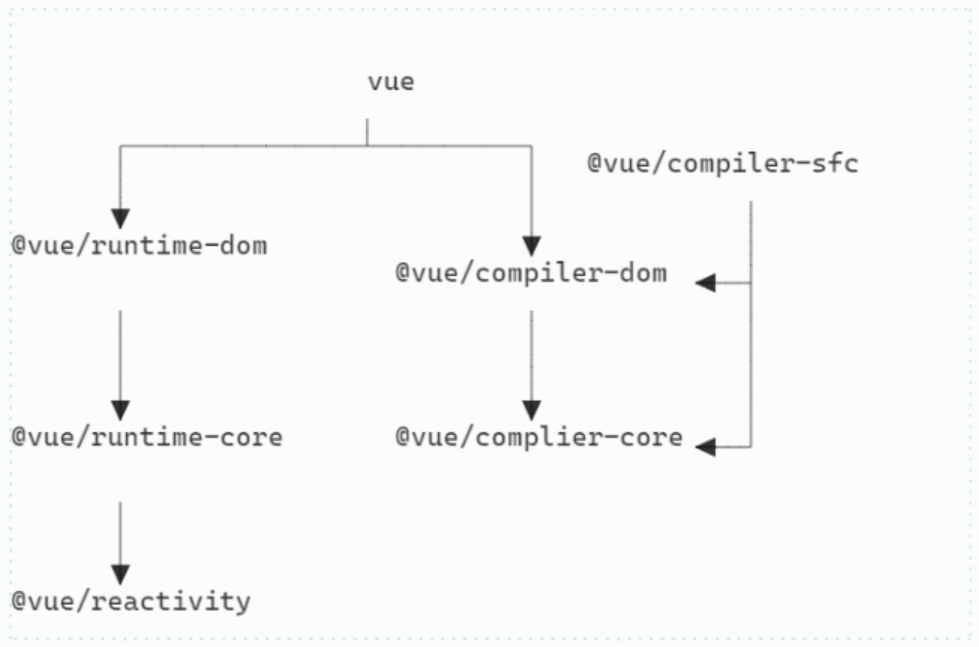
vue 3 采用 monorepo 的形式组织代码,所有的模块都在 packages 目录下。
包与包之间的依赖关系明确, 依赖关系如下:

  • @vue/complier-sfc 是用来解析单文件组件(Single File Component)
  • 编译和运行时分别对应 runtime 模块和 compiler 模块
    • runtime-domruntime-core 解耦
    • complier-domcomplier-core 解耦
    • 这使得 vue 可是不局限于 DOM 平台,可以渲染在其他平台, 例如 canvas
  • 响应式在 reactivity 模块中实现且不依赖其他包,可以独立使用

总的来说,vue 可以大致的分为三块:

  • Reactivity Module
    让我们可以创建响应式对象
  • Compiler Module
    把模板文件转换成 render 函数(可以在浏览器的运行时执行,也可以在构建项目的时候执行)
  • Renderer Moudle
    可以大致分为三个阶段:
  1. Render 阶段:
    render function –> 虚拟 DOM 节点
  2. Mount 阶段:
    虚拟 DOM –>生成 DOM 节点,在网页上显示出来
  3. Patch 阶段:
    比较新旧虚拟 DOM 节点,更新变化的部分

整体流程

首先我们有 template,其中我们可能会使用一些响应式的对象。然后我们把会将模板转换为render function。render function 会创建虚拟 DOM,通过虚拟 DOM 创建真实的DOM 节点。如果响应式对象发生改变就会生成新的虚拟 DOM,比较新旧虚拟 DOM,在真实DOM 上对需要更新的部分进行更新。

javascript 的 AST标准 Estree

为了让机器能够理解代码的含义我们把代码转换为了抽象语法树(AST), AST 的结构是有对应的标准的。在 javascript 中, AST 通常遵循 estree 标准.

ESTree(ECMAScript Tree)是一种用于表示 ECMAScript 源代码语法结构的抽象语法树(AST)的标准。ECMAScript 是 JavaScript 编程语言的标准,而 ESTree 标准则定义了如何表示 JavaScript 代码的语法结构,以方便编译器和其他工具对 JavaScript 代码进行处理。

ESTree 标准定义了一系列用于表示源代码结构的节点类型,并且每个节点都有一些属性来表示它所表示的结构的具体信息。例如,对于一个函数声明,ESTree 标准中定义了“FunctionDeclaration”节点来表示这个结构。“FunctionDeclaration”节点中会包含“id”属性表示函数名,“params”属性表示函数的参数,“body”属性表示函数主体等。

ESTree 标准的目的是让 JavaScript 编译器和工具之间能够交换源代码的语法信息,从而提高 JavaScript 代码的可移植性和可复用性。

==AST 中的节点类型涵盖了 javaScript 中的所有语法结构==
下面是常见的节点类型:

  • Program:表示整个源代码的结构。
  • BlockStatement:表示代码块,例如 if 语句中的代码块、函数主体等。
  • VariableDeclaration:表示变量声明的语句。
  • VariableDeclarator:表示变量的声明,包括变量名和初始值。
  • Identifier:表示标识符。
  • Literal:表示字面量,例如数字、字符串等。
  • ExpressionStatement:表示表达式语句,例如赋值语句、函数调用语句等。
  • BinaryExpression:表示两个操作数的二元表达式,例如加法、乘法等。
  • UnaryExpression:表示一个操作数的一元表达式,例如取反、自增等。
  • FunctionDeclaration:表示函数声明,包括函数名、参数列表和函数主体。
  • ReturnStatement:表示函数返回语句。
  • IfStatement:表示 if 语句,包括判断条件和执行的代码块。
  • SwitchStatement:表示 switch 语句,包括判断条件和多个 case 分支。
  • ForStatement:表示 for 循环语句,包括初始化语句、循环条件和更新语句。
  • WhileStatement:表示 while 循环语句,包括循环条件和执行的代码块。
  • DoWhileStatement:表示 do-while 循环语句,包括循环条件和执行的代码块。
  • BreakStatement:表示 break 语句。
  • ContinueStatement:表示 continue 语句。

在 AST 中,每个节点类型都是独立的,它们之间没有任何继承关系。例如,“FunctionDeclaration”节点类型并不是“BlockStatement”节点类型的子类型,它们之间没有任何关系。

不过,在 AST 中,一些节点类型可能会拥有其他节点类型作为它的子节点。例如,一个“FunctionDeclaration”节点可能会有一个“BlockStatement”节点作为它的子节点,表示函数主体。但这并不意味着“FunctionDeclaration”是“BlockStatement”的子类型,它们之间只是有一个父子关系,并不存在继承关系。

下面将介绍具体的语法结构。

语句(Statement + Declaration)

在 JavaScript 中,语句是指一个独立的执行单元。语句可以是赋值语句、函数调用语句、if 语句、for 语句、while 语句等。
在 JavaScript 中,每个语句都会在 AST 中对应一个节点。下面列出了每种语句对应的 AST 节点类型:

  1. 声明语句:对应 AST 的 VariableDeclaration 节点,表示一个变量声明。

  2. 表达式语句:对应 AST 的 ExpressionStatement 节点,表示一个表达式语句。

  3. 控制语句:对应 AST 的 IfStatement、ForStatement、WhileStatement 等节点,分别表示 if、for、while 等控制语句。

  4. 语句块:对应 AST 的 BlockStatement 节点,表示一个语句块。

  5. 空语句:对应 AST 的 EmptyStatement 节点,表示一个空语句。

注意:AST 节点的类型是由 JavaScript 语言本身定义的,并且可能会在不同的 JavaScript 引擎中有所差异。

声明语句(Declaration)

变量声明 (VariableDeclaration)

1
const x = 123;

对应的 AST

1
2
3
4
VariableDeclaration
└── VariableDeclarator
├── Identifier (x)
└── NumericLiteral (123)

函数声明(FunctionDeclaration)

1
2
3
function add(x, y) {
return x + y;
}

对应的 AST

1
2
3
4
5
6
7
8
9
10
11
FunctionDeclaration
├── Identifier (add)
├── FormalParameters
│ ├── Identifier (x)
│ └── Identifier (y)
└── BlockStatement
├── ReturnStatement
│ └── Binary Expression
│ ├── Identifier (x)
│ └── Identifier (y)
└── End

类声明(ClassDeclaration)

1
2
3
4
5
6
class Point {
constructor(x, y) {
this.x = x;
this.y = y;
}
}

对应的 AST

1
2
3
4
5
6
7
8
9
10
11
12
13
14
15
16
17
18
19
20
21
22
23
ClassDeclaration
├── Identifier (Point)
└── ClassBody
├── MethodDefinition (constructor)
│ ├── Identifier (constructor)
│ ├── FormalParameters
│ │ ├── Identifier (x)
│ │ └── Identifier (y)
│ └── BlockStatement
│ ├── ExpressionStatement
│ │ └── Assignment Expression
│ │ ├── Member Expression
│ │ │ ├── ThisExpression
│ │ │ └── Identifier (x)
│ │ └── Identifier (x)
│ ├── Expression Statement
│ │ └── Assignment Expression
│ │ ├── Member Expression
│ │ │ ├── ThisExpression
│ │ │ └── Identifier (y)
│ │ └── Identifier (y)
│ └── End
└── End

导入声明(ImportDeclaration)

named import:用于导入另一个模块中命名的导出
1
import { sum } from './math';

对应的 AST

1
2
3
4
5
ImportDeclaration
├── ImportSpecifier
│ ├── Identifier (sum)
│ └── Identifier (sum)
└── StringLiteral ('./math')
default import:用于导入另一个模块中默认的导出
1
import foo from './module.js';

AST:

1
2
3
4
ImportDeclaration
├── ImportDefaultSpecifier
│ └── Identifier (foo)
└── Literal ("./module.js")
namespace import:用于导入另一个模块中的所有导出,并将它们作为一个对象。
1
import * as module from './module.js';

AST:

1
2
3
4
ImportDeclaration
├── ImportNamespaceSpecifier
│ └── Identifier (module)
└── Literal ("./module.js")

导出声明(ExportDeclaration)

1. named export:用于将变量、函数、类等命名并导出(ExportNamedDeclaration)
1
2
3
export function add(x, y) {
return x + y;
}

对应的AST

1
2
3
4
5
6
7
8
9
10
11
12
13
ExportNamedDeclaration
├── FunctionDeclaration
│ ├── Identifier (add)
│ ├── FormalParameters
│ │ ├── Identifier (x)
│ │ └── Identifier (y)
│ └── Block Statement
│ ├── Return Statement
│ │ └── Binary Expression
│ │ ├── Identifier (x)
│ │ └── Identifier (y)
│ └── End
└── End
default export:用于将变量、函数、类等作为模块的默认导出(ExportDefaultDeclaration)
1
2
3
export default function add(x, y) {
return x + y;
}

对应的 AST

1
2
3
4
5
6
7
8
9
10
11
12
ExportDefaultDeclaration
└── FunctionDeclaration
├── Identifier (add)
├── FormalParameters
│ ├── Identifier (x)
│ └── Identifier (y)
└── Block Statement
├── Return Statement
│ └── Binary Expression
│ ├── Identifier (x)
│ └── Identifier (y)
└── End
all exports:用于导出模块中的所有导出
1
export * from './module.js';

AST

1
2
ExportAllDeclaration
└── Literal ("./module.js")

表达式语句(ExpressionStatement)

在 JavaScript 中,表达式语句是指一种语句,其中包含表达式,并且在执行表达式时不会返回任何值。表达式语句通常用于对变量进行赋值、调用函数或执行其他操作。
注意:表达式和表达式语句是有区别的。
表达式是指一段代码,它可以被计算出一个值。表达式可以用于赋值、函数调用或其他操作。

1
2
3
4
10 + 20
'Hello, World!'
{ x: 10, y: 20 }
function(x, y) { return x + y }

表达式语句是指一种语句,其中包含表达式,并且在执行表达式时不会返回任何值。表达式语句通常用于对变量进行赋值、调用函数或执行其他操作。
例如,下面是一些表达式语句的例子

1
2
3
4
5
x = 10;
y = x + 20;
console.log('Hello, World!');
add(10, 20);
return x + y;

常见纠结问题:赋值语句会返回值,还是表达式语句吗?
在 JavaScript 中,赋值表达式会返回赋值后的值。但是,当赋值表达式作为一个独立的语句时,它就是一个表达式语句。
例如,下面的代码中的赋值表达式会返回赋值后的值:

1
2
3
4
let x = 10;
let y = (x = 20);

console.log(y); // 20

但是,如果将赋值表达式放在独立的语句中,它就是一个表达式语句,在执行时不会返回任何值:

1
2
let x = 10;
x = 20;

赋值语句

1
x = 456;

对应的 AST 结构如下:

1
2
3
4
ExpressionStatement
└── AssignmentExpression
├── Identifier (x)
└── NumericLiteral (456)

函数调用语句

1
console.log(x);

对应的 AST 结构如下:

1
2
3
4
5
6
ExpressionStatement
└── CallExpression
├── MemberExpression
│ ├── Identifier (console)
│ └── Identifier (log)
└── Identifier (x)

return 语句

1
return x + y;
1
2
3
4
ReturnStatement
└── Binary Expression
├── Identifier (x)
└── Identifier (y)

throw 语句

1
throw new Error('Something went wrong');
1
2
3
4
ThrowStatement
└── NewExpression
├── Identifier (Error)
└── StringLiteral ('Something went wrong')

控制语句(control statement)

在 JavaScript 中,控制语句是指用于控制程序流程的语句。控制语句可以用于执行不同的操作、跳转到不同的位置或做出决策。

if 语句(IfStatement)

1
2
3
if (x > 100) {
console.log('x is larger than 100');
}

对应的 AST 结构如下:

1
2
3
4
5
6
7
8
9
10
11
12
13
IfStatement
├── BinaryExpression
│ ├── Identifier (x)
│ ├── >
│ └── NumericLiteral (100)
├── BlockStatement
│ └── Expression Statement
│ └── CallExpression
│ ├── MemberExpression
│ │ ├── Identifier (console)
│ │ └── Identifier (log)
│ └── StringLiteral ('x is larger than 100')
└── Null

switch 语句

1
2
3
4
5
6
7
8
9
10
switch (x) {
case 10:
console.log('x is 10');
break;
case 20:
console.log('x is 20');
break;
default:
console.log('x is neither 10 nor 20');
}

对应的 AST

1
2
3
4
5
6
7
8
9
10
11
12
13
14
15
16
17
18
19
20
21
22
23
24
25
26
SwitchStatement
├── Identifier (x)
├── SwitchCase
│ ├── NumericLiteral (10)
│ └── ExpressionStatement
│ └── CallExpression
│ ├── MemberExpression
│ │ ├── Identifier (console)
│ │ └── Identifier (log)
│ └── StringLiteral ('x is 10')
├── SwitchCase
│ ├── NumericLiteral (20)
│ └── ExpressionStatement
│ └── CallExpression
│ ├── MemberExpression
│ │ ├── Identifier (console)
│ │ └── Identifier (log)
│ └── StringLiteral ('x is 20')
└── SwitchCase
├── null
└── ExpressionStatement
└── CallExpression
├── MemberExpression
│ ├── Identifier (console)
│ └── Identifier (log)
└── StringLiteral ('x is neither 10 nor 20')

while 循环

1
2
3
4
5
let i = 0;
while (i < 10) {
console.log(i);
i++;
}

对应的AST

1
2
3
4
5
6
7
8
9
10
11
12
13
14
15
16
While Statement
├── Binary Expression
│ ├── Identifier (i)
│ ├── <
│ └── NumericLiteral (10)
└── Block Statement
├── Expression Statement
│ └── Call Expression
│ ├── Member Expression
│ │ ├── Identifier (console)
│ │ └── Identifier (log)
│ └── Identifier (i)
└── Expression Statement
└── Update Expression
├── Identifier (i)
└── ++

for 循环

1
2
3
for (let i = 0; i < 10; i++) {
console.log(i);
}

对应的 AST 结构如下:

1
2
3
4
5
6
7
8
9
10
11
12
13
14
15
16
17
18
19
20
21
ForStatement
├── VariableDeclaration
│ ├── VariableDeclarator
│ │ ├── Identifier (i)
│ │ └── NumericLiteral (0)
│ └── ;
├── BinaryExpression
│ ├── Identifier (i)
│ ├── <
│ └── NumericLiteral (10)
├── UpdateExpression
│ ├── Identifier (i)
│ ├── ++
│ └── true
└── BlockStatement
└── ExpressionStatement
└── CallExpression
├── MemberExpression
│ ├── Identifier (console)
│ └── Identifier (log)
└── Identifier (i)

while循环

1
2
3
4
while (x > 0) {
console.log(x);
x--;
}

对应的 AST 结构如下:

1
2
3
4
5
6
7
8
9
10
11
12
13
14
15
16
17
WhileStatement
├── BinaryExpression
│ ├── Identifier (x)
│ ├── >
│ └── NumericLiteral (0)
└── Block Statement
├── ExpressionStatement
│ └── CallExpression
│ ├── MemberExpression
│ │ ├── Identifier (console)
│ │ └── Identifier (log)
│ └── Identifier (x)
└── Expression Statement
└── UpdateExpression
├── Identifier (x)
├── --
└── true

do-while 循环

1
2
3
4
5
let i = 0;
do {
console.log(i);
i++;
} while (i < 10);

AST:

1
2
3
4
5
6
7
8
9
10
11
12
13
14
15
16
DoWhile Statement
├── Block Statement
│ ├── Expression Statement
│ │ └── Call Expression
│ │ ├── Member Expression
│ │ │ ├── Identifier (console)
│ │ │ └── Identifier (log)
│ │ └── Identifier (i)
│ └── Expression Statement
│ └── Update Expression
│ ├── Identifier (i)
│ └── ++
└── Binary Expression
├── Identifier (i)
├── <
└── NumericLiteral (10)

for-in 循环

1
2
3
4
const obj = {x: 10, y: 20};
for (const key in obj) {
console.log(key, obj[key]);
}

AST:

1
2
3
4
5
6
7
8
9
10
11
12
13
14
15
16
17
18
19
20
ForIn Statement
├── Variable Declaration
│ ├── Identifier (key)
│ └── Object Expression
│ ├── Property
│ │ ├── Identifier (x)
│ │ └── NumericLiteral (10)
│ └── Property
│ ├── Identifier (y)
│ └── NumericLiteral (20)
└── Block Statement
├── Expression Statement
│ └── Call Expression
│ ├── Member Expression
│ │ ├── Identifier (console)
│ │ └── Identifier (log)
│ ├── Identifier (key)
│ └── Member Expression
│ ├── Identifier (obj)
│ └── Identifier (key)

for-of 循环

1
2
3
4
const arr = [1, 2, 3];
for (const value of arr) {
console.log(value);
}
1
2
3
4
5
6
7
8
9
10
11
12
13
14
15
ForOf Statement
├── Variable Declaration
│ ├── Identifier (value)
│ └── Array Expression
│ ├── NumericLiteral (1)
│ ├── NumericLiteral (2)
│ └── NumericLiteral (3)
└── Block Statement
└── Expression Statement
└── Call Expression
├── Member Expression
│ ├── Identifier (console)
│ └── Identifier (log)
└── Identifier (value)

AST:

字面量(Literal)

字面量是指直接在程序中写出来的常量值,JavaScript 支持五种基本的字面量:数字、字符串、布尔值、对象和数组。

对应在 JavaScript 抽象语法树(AST)中,这些字面量会用到以下几种节点:

  • 数字字面量对应 NumericLiteral 节点,表示一个数字字面量。
  • 字符串字面量对应 StringLiteral 节点,表示一个字符串字面量。
  • 布尔值字面量对应 BooleanLiteral 节点,表示一个布尔值字面量。
  • 对象字面量对应 ObjectExpression 节点,表示一个对象字面量。对象字面量中的每个属性对应一个 Property 节点。
  • 数组字面量对应 ArrayExpression 节点,表示一个数组字面量。数组字面量中的每个元素对应一个 ArrayExpression 的子节点。
    例如,以下代码:
    1
    2
    3
    4
    5
    const x = 123;
    const y = 'hello';
    const z = true;
    const obj = { a: 1, b: 2 };
    const arr = [1, 2, 3];
    对应的 AST 可能长这样:
    1
    2
    3
    4
    5
    6
    7
    8
    9
    10
    11
    12
    13
    14
    15
    16
    17
    18
    19
    20
    21
    22
    23
    24
    25
    26
    27
    28
    29
    30
    31
    32
    33
    34
    35
    Program
    ├── VariableDeclaration
    │ ├── VariableDeclarator
    │ │ ├── Identifier (x)
    │ │ └── NumericLiteral (123)
    │ └── ;
    ├── VariableDeclaration
    │ ├── VariableDeclarator
    │ │ ├── Identifier (y)
    │ │ └── StringLiteral ('hello')
    │ └── ;
    ├── VariableDeclaration
    │ ├── VariableDeclarator
    │ │ ├── Identifier (z)
    │ │ └── BooleanLiteral (true)
    │ └── ;
    ├── VariableDeclaration
    │ ├── VariableDeclarator
    │ │ ├── Identifier (obj)
    │ │ └── ObjectExpression
    │ │ ├── Property
    │ │ │ ├── Identifier (a)
    │ │ │ └── NumericLiteral (1)
    │ │ └── Property
    │ │ ├── Identifier (b)
    │ │ └── NumericLiteral (2)
    │ └── ;
    └── VariableDeclaration
    ├── VariableDeclarator
    │ ├── Identifier (arr)
    │ └── ArrayExpression
    │ ├── NumericLiteral (1)
    │ ├── NumericLiteral (2)
    │ └── NumericLiteral (3)
    └── ;

标识符 Identifier

在上面的例子中也可以看到不少 Identifier, 标识符也是最小的语法单元之一。
在 JavaScript 中,标识符是指变量、常量、函数名或属性名。标识符是由一个或多个字母、数字或下划线组成的,且必须以字母或下划线开头。

标识符的作用是在程序中标记变量、常量、函数或属性的名字,便于程序中的变量、常量、函数或属性能够被引用和使用。

例如,以下代码中的 xyadd 都是标识符:

1
2
3
4
5
6
7
8
let x = 123;
const y = 'hello';

function add(a, b) {
return a + b;
}

console.log(add(x, y));

JavaScript 的标识符遵循一些命名规则,例如:

  • 不能使用关键字作为标识符名。
  • 不能使用保留字作为标识符名。
  • 不能使用特殊字符作为标识符名。

标识符在 JavaScript 抽象语法树(AST)中对应的节点为 Identifier
例如,在以下代码的 AST 中:

1
const x = 123;

变量 x 对应的节点是:

1
2
3
4
VariableDeclaration
└── VariableDeclarator
├── Identifier (x)
└── NumericLiteral (123)

根节点(Program)

Program 节点是 AST 中的顶级节点,它表示 JavaScript 代码中的整个程序。Program 节点通常包含多个子节点,表示程序中的各个部分,如函数声明、变量声明、表达式等。

Derective 属性

表示 JavaScript 代码中的指令语句。指令语句是 JavaScript 代码中的一种特殊语句,它们以 'use strict' 开头,用于指定 JavaScript 代码的运行模式。

与位置有关的属性

与位置有关的节点在 AST 中通常会包含有关该节点在源代码中的位置的信息。这些信息可以用于在编译器或代码编辑器中显示错误信息,或者在源代码转换过程中确定节点在源代码中的位置。

例如,在 JavaScript 中,可以使用 startend 属性来表示节点在源代码中的起始位置和结束位置。这些属性通常是一个对象,包含有关该位置的行号和列号的信息。

1
const a = 1

AST explorer (以babel为例)中:

![[../../images/quicker_306054b7-0f7e-4c5c-8e3f-01017d0b1521.png]]

注释节点

在 JavaScript 中,注释节点可以使用两种类型之一表示:LineBlock

  • Line 表示单行注释,其中注释以两个斜杠(//)开头。
  • Block 表示多行注释,其中注释以一对星号(/*)开始,以一对星号(*/)结束。

例如,以下代码片段中的注释将生成一个 Line 节点:

1
2
// This is a single-line comment
let x = 123;

AST:

1
2
3
4
5
Program
└── VariableDeclaration
└── VariableDeclarator
├── Identifier (x)
└── NumericLiteral (123)

以下代码片段中的注释将生成一个 Block 节点:

1
2
3
/* This is a
multi-line comment */
let x = 123;

AST:

1
2
3
4
5
6
7
Program
├── Block
│ └── Comment (This is a\nmulti-line comment)
└── VariableDeclaration
└── VariableDeclarator
├── Identifier (x)
└── NumericLiteral (123)

对 AST 进行处理

在生成 AST 以后就可以对 AST 进行处理

  • 分析 AST 结构进行规范性检查 -> lint 工具的本质
  • 从 AST 中抽取注释 -> 文档自动生成工具
  • 分析类型信息 -> 类型工具
  • 直接执行语句 -> js 解释器

总结

在 JavaScript 中,AST(抽象语法树)是一种表示代码的数据结构。它使用节点来表示代码中的各种元素,如变量、常量、表达式、函数声明等。AST 可以用来表示 JavaScript 代码的语法结构,并且可以通过遍历 AST 来分析、修改或生成代码。

链接

AST explorer 是探索 AST 的好地方。

转译的开始

本质上,babel 是一 JavaScriptpt 转译器 (javascript transpiler)。
为了理解代码第一部就是将它转换成抽象语法树 (Abstract Sytax Tree), 这就是 解析阶段(parse phase)。
Babel 的解析阶段主要负责将 JavaScript 代码解析成抽象语法树,为后续的转换和生成提供基础。它是 Babel 编译器的第一个阶段,为后续的转换和生成提供了重要的基础。

在解析阶段,Babel 会使用一个名为 babylon 的 JavaScript 解析器来读取 JavaScript 代码并解析成 AST。babylon 解析器会按照 JavaScript 语言的语法规则对代码进行分析,并将代码转换为一系列的节点,每个节点表示代码中的一个语法单元。
例如,对于如下 JavaScript 代码:

1
2
3
function sum(a, b) {
return a + b;
}

Babel 会将它解析成如下 AST:

1
2
3
4
5
6
7
8
9
10
11
12
13
14
15
16
17
18
19
20
21
22
23
24
25
26
27
28
29
30
31
32
33
34
35
36
37
38
39
40
41
42
43
{
"type": "Program",
"body": [
{
"type": "FunctionDeclaration",
"id": {
"type": "Identifier",
"name": "sum"
},
"params": [
{
"type": "Identifier",
"name": "a"
},
{
"type": "Identifier",
"name": "b"
}
],
"body": {
"type": "BlockStatement",
"body": [
{
"type": "ReturnStatement",
"argument": {
"type": "BinaryExpression",
"operator": "+",
"left": {
"type": "Identifier",
"name": "a"
},
"right": {
"type": "Identifier",
"name": "b"
}
}
}
]
}
}
]
}

从上面的 AST 可以看出,Babel 在解析阶段会将 JavaScript 代码按照语法规则分解成一系列的节点,每个节点表示代码中的一个语法单元。这些节点的组合组成了一棵抽象语法树,表示了整个 JavaScript 代码的结构和语法。

这个过程分为词法分析和语法分析

词法分析:

1
2
3
4
5
6
7
8
9
10
11
12
13
14
function  // 关键字
sum // 标识符
( // 左圆括号
a // 标识符
, // 逗号
b // 标识符
) // 右圆括号
{ // 左大括号
return // 关键字
a // 标识符
+ // 加法运算符
b // 标识符
; // 分号
} // 右大括号

语法分析:

“function”是一个关键字,表示定义函数。“sum”是一个标识符,表示函数的名称。圆括号中的“a”和“b”也是标识符,表示函数的参数。大括号中的“return”是关键字,表示返回值。“a”和“b”之间的“+”是加法运算符,表示两个参数的和。最后的分号表示语句结束。

综上,该代码定义了一个名为“sum”的函数,该函数接受两个参数“a”和“b”,并返回这两个参数的和。

最后生成 [[抽象语法树(AST)]]

1
2
3
4
5
6
7
8
9
10
11
FunctionDeclaration
├── Identifier (sum)
├── FormalParameters
│ ├── BindingIdentifier (a)
│ └── BindingIdentifier (b)
└── BlockStatement
└── ReturnStatement
└── BinaryExpression
├── Identifier (a)
├── "+"
└── Identifier (b)

@babel/parser

Babel/parser 是一个 JavaScript 解析器,可以将 JavaScript 代码解析成一个抽象语法树 (AST)。这个 AST 可以被其他工具使用,例如 Babel,一个 JavaScript 编译器,可以使用 AST 来将新版本的 JavaScript 代码转译成旧版本的 JavaScript 代码,以便在旧版本的浏览器或运行环境中运行。
Babel/parser 可以解析 ECMAScript 的所有版本,包括 ES5、ES6、ES7 等。它还支持解析 JSX,一种在 React 应用中使用的 JavaScript 语法扩展(默认不支持, 可以添加插件实现)。

使用 Babel/parser 可以很方便地进行代码分析、转换和优化。你可以使用它来检查你的代码中是否有语法错误,或者提取你的代码中的某些信息,例如函数调用、变量声明等。你还可以使用它来构建代码生成器或代码修改器。
Babel/parser 是一个开源项目,你可以在 GitHub 上找到它的源代码:https://github.com/babel/babel/tree/master/packages/babel-parser

你可以使用 npm 来安装 Babel/parser:

1
npm install @babel/parser

然后就可以在你的 JavaScript 代码中使用它了:

1
2
3
4
const parser = require('@babel/parser');

const ast = parser.parse('1 + 2');
console.log(ast);

结果如下:

1
2
3
4
5
6
7
8
9
10
11
12
13
14
15
16
17
18
19
20
21
22
23
24
25
26
27
28
Node {
type: 'File',
start: 0,
end: 5,
loc: SourceLocation {
start: Position { line: 1, column: 0, index: 0 },
end: Position { line: 1, column: 5, index: 5 },
filename: undefined,
identifierName: undefined
},
errors: [],
program: Node {
type: 'Program',
start: 0,
end: 5,
loc: SourceLocation {
start: [Position],
end: [Position],
filename: undefined,
identifierName: undefined
},
sourceType: 'script',
interpreter: null,
body: [ [Node] ],
directives: []
},
comments: []
}

parse 函数签名如下

1
2
3
4
5
6
parse(code: string, options?: ParserOptions): {
type: 'Program',
body: Array<Node>,
sourceType: 'script' | 'module',
...
}

其中,code 参数是待解析的 JavaScript 代码字符串,options 参数是可选的,用于配置解析过程的选项。

ParserOptions 类型包含以下属性:

  • sourceType: 值为 "script""module"unambiguous,用于指定代码的模块化方式。

    • "script": 不使用 ES module 模块化方式
    • "module": 使用 ES module 模块化方式
    • unambiguous: 根据语法是否使用 ES module 模块化方式
  • allowImportExportEverywhere: 值为布尔值,用于指定是否允许在任何地方使用 importexport 语句。

  • allowReturnOutsideFunction: 值为布尔值,用于指定是否允许在函数外使用 return 语句。

  • allowSuperOutsideMethod: 值为布尔值,用于指定是否允许在方法外使用 super 关键字。

  • strictMode: 值为布尔值,用于指定是否启用严格模式。

  • plugins: 一个字符串数组,用于指定要启用的插件。

  • ranges: 值为布尔值,用于指定是否在解析后的 AST 中包含源代码中每个节点的起始和结束位置。

  • locations: 值为布尔值,用于指定是否在解析后的 AST 中包含源代码中每个节点的行号和列号。

  • onToken: 值为函数,用于在解析每个词法单元时调用的回调函数。

  • onComment: 值为函数,用于在解析每个注释时调用的回调函数。

  • tolerant: 值为布尔值,用于指定是否启用宽容模式。在宽容模式下,解析器会忽略语法错误,并尽量生成完整的 AST。

  • ecmaVersion: 值为数字,用于指定要解析的 ECMAScript 版本。默认值为当前环境支持的最高版本。

  • sourceFilename: 值为字符串,用于指定要解析的代码文件名。

  • preserveParens: 值为布尔值,用于指定是否在解析后的 AST 中保留括号。

  • errorRecovery: 用于控制解析过程中遇到语法错误时的行为。它有两个可能的值:

    • true: 表示在遇到语法错误时,解析器会尽量生成完整的 AST,并忽略语法错误。
    • false: 表示在遇到语法错误时,解析器会立即抛出异常,终止

当然,你也可以使用 parseExpression 函数来解析 JavaScript 表达式。它的签名如下:

1
parseExpression(code: string, options?: ParserOptions): Expression | Directive

其中,code 参数是待解析的 JavaScript 表达式字符串,options 参数是可选的,用于配置解析过程的选项。

Babel Parser 还提供了一些其他的函数,如 parseStatementparseBlock,用于解析 JavaScript 语句和代码块。

另外,你也可以使用 parse 函数的变体来解析 ECMAScript 模块,如 parseModuleparseModuleExpression

babel/parser 还支持通过插件机制来扩展其功能。你可以通过在 ParserOptions 中指定插件名称来启用插件。

例如,如果你想使用 Babel Parser 支持 JSX 语法,可以在 ParserOptions 中指定 "jsx" 插件:

1
2
3
4
const ast = parse(code, {
sourceType: 'module',
plugins: ['jsx']
});

Babel 的作用

由于 javascript 语言再不断的发展, 通常来讲语言的新特性会提高开发人员的效率,也更友好和容易使用。但是可能出现浏览器不支持的情况。 为了解决这个问题我们可以使用 babel 对代码进行转译,使之成为浏览器支持的旧版本的 javascript 代码。

总结起来就一句话: “让我们可以自由的使用下一代的 javascript”

babel 7 支持转换为特定的版本,可以在 .babelrc 中指定

1
{ "presets": ["es2015"] }

babel 还可以将 TypeScript 和 Flow 等转换为 js

利用 babel 暴露的Api 还可以用来函数插桩、和自动国际化.

故事

babel 这个词来源于圣经故事,不同语言的人。在故事中,一群说着同一种语言的人决定建造一座可以到达天堂的塔。上帝看到他们的骄傲和想要像他一样的欲望,导致他们说不同的语言,因此他们无法互相理解,也无法完成他们的塔。

基本流程

源码本质上是字符串, 所以 babel 也可以说是对字符串的处理. 这种字符串之间的转换大概包括三个阶段:

  1. parse phase(解析阶段)
    Babel 会使用 JavaScript 引擎的语法分析器来解析代码,将其转换为一种内部表示形式(通常是一个抽象语法树(AST))。
  2. transform (转换阶段)
    Babel 会使用一系列插件来转换代码。这些插件可以用来添加新的语言特性,修改现有特性的行为,或者移除不支持的特性。
  3. generate(生成阶段)
    最后,Babel 会将转换后的代码转换为 JavaScript 代码,并输出结果。同时生成 sourceMap, 即源码和生成代码之间的关系。
0%